
How to Add People Who Don’t Have a BaatLo Account (Ghost Members)
Every group has that one person.
They’re happy to come on the trip, split the dinner, chip in for the birthday gift — but ask them to sign up for anything and you’ll get a response somewhere between a heavy sigh and complete radio silence.
Maybe it’s your dad who refuses to create “yet another account.” Maybe it’s a colleague who’ll GPay or PhonePe you their share but won’t tap a link on principle. Maybe it’s your friend’s partner who joined the trip last minute and isn’t going to sign up for a tool they’ll use exactly once.
The problem is, they still owe money. Or they’re owed money. Either way, leaving them out of the tracker means your numbers are wrong, and wrong numbers are the whole reason you needed a tracker in the first place.
That’s what Ghost Members solve.
What’s a Ghost Member?
A Ghost Member is a name-only placeholder in your BaatLo group. No email, no account, no sign-up — just a name.
You type “Dad” or “Priya” or “Amit’s girlfriend” and they exist in the group. They can be included in expense splits, their balance is tracked, and they show up in settlement calculations just like everyone else.
The only difference is that there’s no real account (a registered email) behind the name. They can’t log in, they can’t add expenses themselves, and they won’t get notifications. Someone in the group — usually the person who added them — manages their side of things.
How to Add a Ghost Member
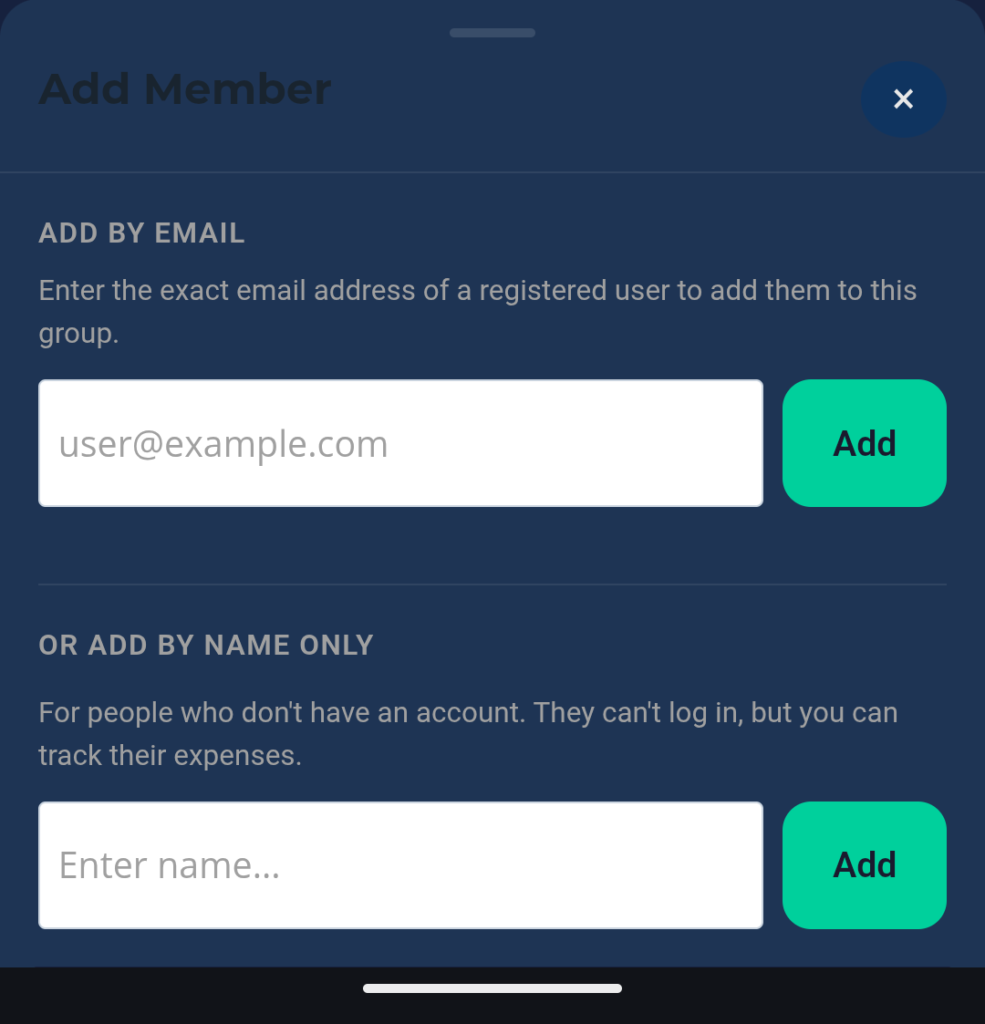
From your Group Settings (Gear Icon at the top right corner of group main page), scroll a bit to find and tap the option to Add a Member. Instead of sharing an invite link or entering an email, choose the option to Add by Name Only. Type the name, confirm, and they’re in.
That’s it. No invitation sent, no sign-up required, no “I’ll do it later” that actually means never.
How Expenses Work with Ghost Members
Ghost Members participate in splits the same way regular members do.
When someone adds an expense and splits it across the group, the Ghost Member’s share is calculated and added to their running balance. If the Ghost Member paid for something, whoever manages their entry can log that expense on their behalf.
At any point, you can see what the Ghost Member owes or is owed — just like any other member of the group.
How to Settle Up with a Ghost Member
Since a Ghost Member can’t log in and record a payment, settlement happens offline. You handle the actual money transfer however works best — cash, UPI, bank transfer, buying them lunch, whatever the two of you agree on — and then record it in BaatLo.
This keeps the group’s numbers accurate even though the payment happened outside the app. Once the settlement is recorded, the Ghost Member’s balance updates and the group totals stay clean.
When to Use Ghost Members vs Invite Links
This is simpler than it sounds:
- Invite links are for people who are willing to create an account. Most people fall into this category — it takes a minute, they get their own access, they can add expenses and see balances themselves. Start with the invite link.
- Ghost Members are for people who genuinely won’t sign up. Don’t force it. Add them as a Ghost Member (by their name or nickname), track their share, settle offline, and move on with your life.
If you’re not sure which someone will be, send the invite link first. Give it a day or two. If they don’t bite, add them as a Ghost Member and stop worrying about it.
Quick Recap
- Ghost Members are name-only placeholders — no account needed
- They’re included in expense splits and settlement calculations like regular members
- Someone in the group manages their expenses on their behalf
- Settlements happen offline and are recorded in BaatLo to keep balances accurate
- Use invite links first; Ghost Members are the fallback for the holdouts
Got someone in your group who won’t sign up? Add them as a Ghost Member on BaatLo and keep your numbers right anyway.
One Comment